Clinical photos in seconds
Take the photo, pick the body region and add your findings. It joins the patient's visit with no extra steps.
MediSnap is the iOS and Android app doctors use to document every consultation: shoot, annotate, dictate a note, and find everything in MyCabinet.
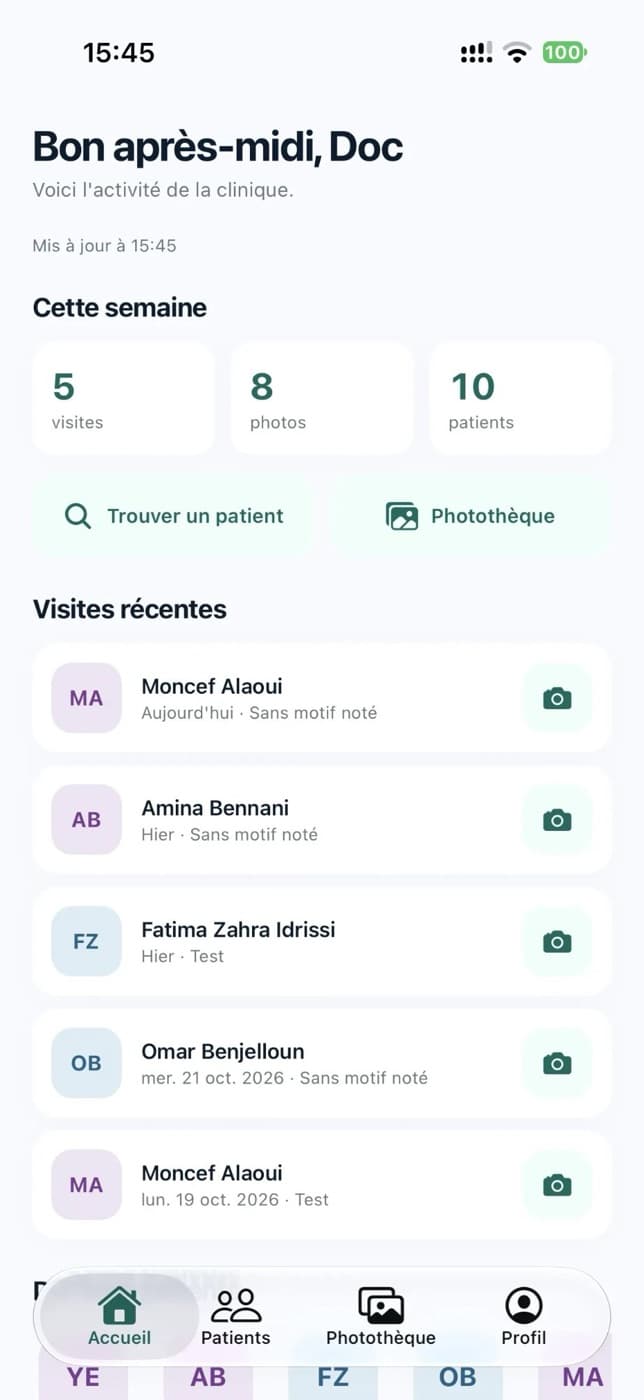
Sent to the record
No more photos lost in the phone gallery. MediSnap ties every image to the right visit of the right patient, with the doctor's findings and annotations.
Request accessAn app built for clinic staff: quick to open, clear to use, safe for health data.
Take the photo, pick the body region and add your findings. It joins the patient's visit with no extra steps.
Circle, draw and write right on the image to mark what matters before you save it.
Dictate a remark on a photo. The microphone only turns on while you record, never in the background.
If the clinic network drops, the photo waits in the app's queue and uploads as soon as you reconnect.
Scan your clinic's QR code to connect the app to the right server, with no address to type.
The administrator creates staff accounts (doctor, nurse, administrator). Everyone sees what their role allows.
No training, no file handling.
Find the patient by name or chart number, or create a new one.
Take one or more photos, set the region, draw, add an audio note if needed.
The photo shows up in the visit, the library and the findings of the clinic dashboard.
Health data deserves better than a photo gallery. MediSnap is built so nothing leaves the clinic unless you decide it does.
No advertising, analytics or tracking SDK. No GPS, and no access to contacts or calendar.
Read the privacy policyNo. The app is for authorized clinic staff only. Patients do not sign in to the mobile app.
iPhone, iPad and Android phones. It is the same product on both systems.
On your clinic's MediSnap server. Each clinic has its own server, and staff only reach the records on that server after signing in.
Only if a staff member chooses to save them, and the clinic decides whether that is allowed. A saved copy may sync through iCloud Photos or Google Photos depending on device settings.
Accounts are created by the clinic administrator. Contact us to enable MediSnap with your MyCabinet subscription.

Let's talk about your clinic. We enable MediSnap alongside your MyCabinet workspace.
Contact us